
Problem Description
After going to File > Help > Check for Product Updates I get the following error
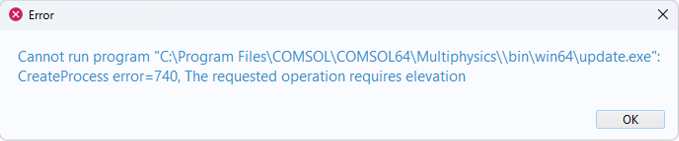
Solution
This issue seems to arise from a Windows Security update. There are two suggested workarounds
Launch COMSOL Multiphysics with administrator privileges.
To do this, right-click on your COMSOL Multiphysics shortcut and select Run as Administrator
When the program has opened go to File > Help > Check for Product Updates to start the update process.
Launch the update executable directly.
To do this, go to the COMSOL Multiphysics 6.4 > COMSOL Launchers directory on the Start menu. From the COMSOL Launchers directory, run the shortcut called Update. If you use an older version than 6.4, go to the corresponding COMSOL Launchers directory.
Recherche par catégorie
Messages d'erreur (66)Import (7)
Géométrie (11)
Physiques (11)
Solveur (38)
Installation (42)
Maillage (14)
Général (39)
Mécanique des structures (2)
Mécanique des fluides (2)
Post-traitement (4)
Export (1)
Dessin (1)
Informations produit (6)
Multiphysique (1)
Modèles utilisateurs (1)
Electromagnétisme (1)
COMSOL makes every reasonable effort to verify the information you view on this page. Resources and documents are provided for your information only, and COMSOL makes no explicit or implied claims to their validity. COMSOL does not assume any legal liability for the accuracy of the data disclosed. Any trademarks referenced in this document are the property of their respective owners. Consult your product manuals for complete trademark details.


